© All rights reserved. Powered by Techronicler



CalPhishing and ConsentFix: The New Playbook for Persistent, Trust-Based Cyber Attacks
By Daud Jawad, Security Engineer, Fortra

The more calendar invite phishing campaigns are observed, the more it feels like this trend is evolving beyond a simple delivery method.
CalPhishing is being used as a trust layer, a persistence layer, and in many cases, it is the first step into an authentication flow. Instead of relying on the email body to persuade the user, the attacker shifts the context into the calendar invite itself. The invite becomes persistent, familiar, and action-oriented. When used alongside ConsentFix, this makes account takeover attempts significantly more effective than many traditional phishing techniques.
Together, CalPhishing and ConsentFix create a phishing path that feels familiar to the user, persists beyond the inbox, and can lead directly into an account takeover flow. This combination can bypass many email security controls and remove several of the warning signs users have been trained to look for in phishing awareness programs.
In this article, we will examine what ConsentFix actually is, including both legitimate and illegitimate use cases. We will also cover the four main CalPhishing types observed, how CalPhishing uses ConsentFix as part of the phishing chain, and what individuals and organizations can do to protect themselves.
Understanding ConsentFix: What It Is and How It Works
ConsentFix is a device code phishing technique that abuses a legitimate authentication flow instead of relying on an illegitimate login page.
The device code flow was built for devices and apps that cannot easily complete a normal browser-based sign-in. Think meeting room devices, shared kiosks, smart displays, digital signage, IoT-style endpoints, and command-line tools such as Azure CLI.
In those cases, the device shows a short code, and the user completes the sign-in from another browser – that is the legitimate use case.
The phishing version flips the trust model. The attacker starts the device code sign-in from a system they control, then sends the victim the code through a lure.
The dangerous part is that the user will be prompted through a real Microsoft sign-in page. They enter the code, authenticate normally, and may even complete MFA. From the user’s side, the flow will feel legitimate at this point.
From the attacker’s side, the victim has just authorized the session or app flow that the attacker started. This means the attacker does not need to steal the password in the traditional way; the victim completes the authentication process for them and provides the authentication token, ready to be used.
From what I have observed, the activity mainly falls into four types
Type 1: Legitimate vendor delivery
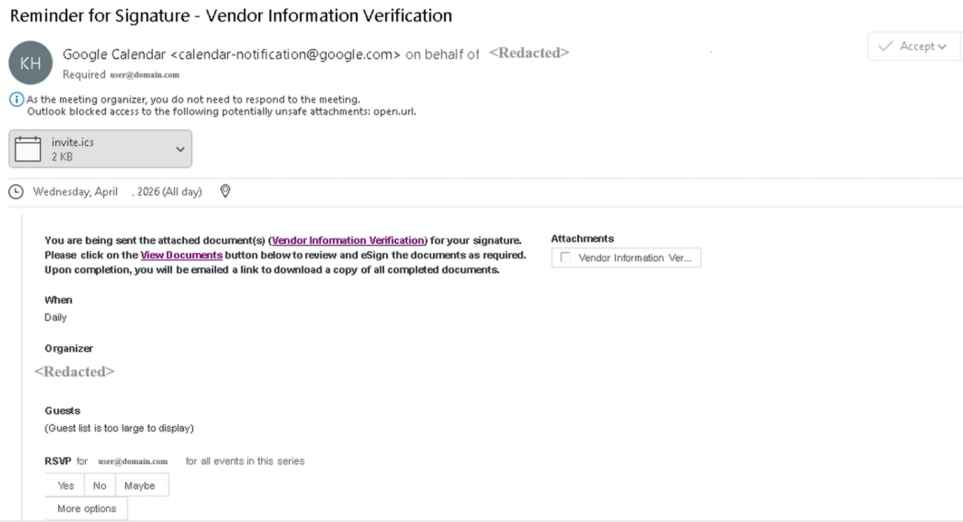
Legitimate vendor delivery occurs when, as said, the invite is delivered through a legitimate vendor. Google Calendar is one of the main choices observed for delivery.
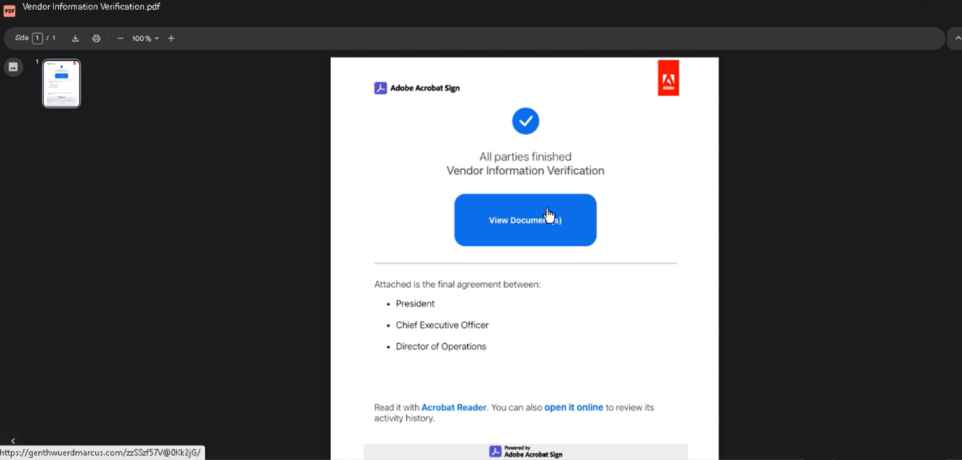
The invite usually prompts the user to click a button that redirects them to a malicious URL. That URL then loads a fake DocuSign, Adobe Acrobat, PDF viewer, document review page, or another equivalent browser-based lure. From there, the user is moved toward a ConsentFix-style authentication flow that results in session token theft.
Type 2: Calendar invite body manipulation
Body manipulation generally uses a compromised external or internal account.
The invite body usually does most of the work. The attacker may use HTML to make the invite look like an official document, a Microsoft-themed notice, an internal workflow, or a business request.
The user is still pushed toward a URL click and the ConsentFix-related authentication type, but the trust comes from the sender and the calendar context. It looks tied to a business process, and that is often enough.
Type 3: Attachment-led delivery
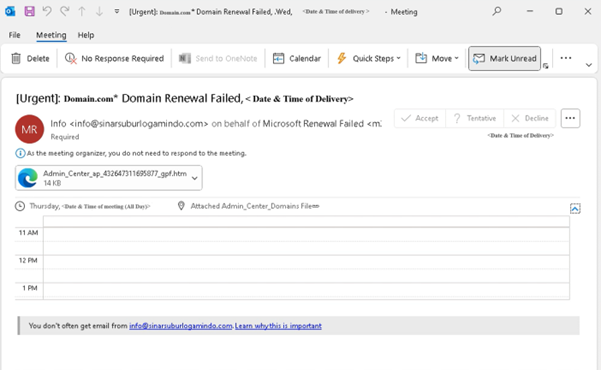
Attachment-led delivery can use a compromised sender, a newly registered domain, or a legitimate delivery platform, but the focus is the attachment instead of the URL.
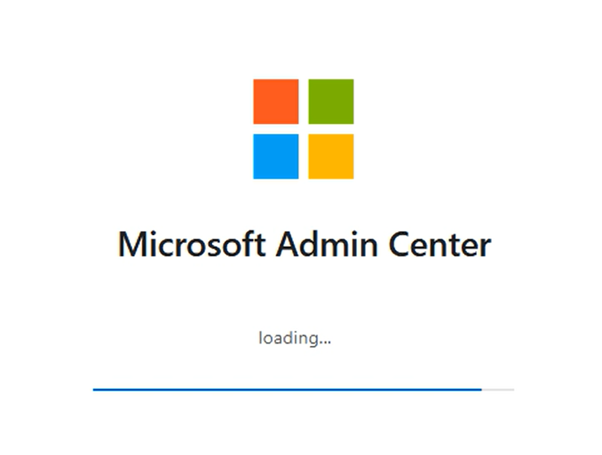
The attachment is commonly an .htm file. When opened, it presents a targeted login page, often with the recipient address already filled in.
At this stage, the target is credential capture. In some cases, the flow may then push the user toward a Microsoft login, consent prompt, or another authentication step, which can move the attack into token or session theft territory.
The invalidation of the domain the attachment reaches out to after a few login attempts is also worth calling out. It likely helps limit repeated testing and makes it harder for researchers to keep replaying the flow to understand the backend.
Type 4: Pure social engineering
Socially engineered CalPhish are the quietest and most difficult examples to detect.
There may be no URL and no attachment. The abuse is in the wording, the subject line, the invite body, and the way the sender is displayed. An attacker can use “on behalf of” style presentation and carefully crafted text to make the invite appear as though it came from a vendor, internal user, manager, C-level executive, client, or trusted team.
Unlike more direct phishing attempts, this type may not try to compromise the target during the first interaction. Instead, it can be used to build familiarity and trust ahead of a later step, such as a follow-up email, phone call, file share, or another calendar invite.
This suggests CalPhishing could also be used to prime selected users as part of targeted spear-phishing efforts. We have not observed this type at the same volume as the others yet, but the risk is clear.
How does CalPhishing use ConsentFix?
In a CalPhishing-style chain, the lure does not need to live only inside the email body. It can sit inside the calendar invite, ICS attachment, event description, meeting location, reminder text, or a follow-up message.
That gives the attacker one major advantage: persistence.
A normal phishing email is usually judged once. The user sees it, ignores it, reports it, or clicks it. A calendar invite behaves differently: it can remain on the calendar, even trigger reminders, show up on the mobile, and can be opened later from a calendar view when the user is already thinking about meetings and work.
The invite does not just deliver the lure; it keeps the lure alive.
The themes can also be wider scope. It can be framed as an executive briefing, HR review, payroll issue, legal notice, supplier update, client meeting, company-wide announcement, document approval, or security verification.
The attacker’s goal is simple: create enough trust and urgency for the user to follow the instruction and enter the code. The made-up part is not always the authentication flow. Sometimes the made-up part is just the story that gets the user there.
What Individuals and Organisations can do
For organizations that truly need device code flow, the goal should not be open access; it should be controlled access.
Allow only the users and workflows that need it, such as approved shared device teams, meeting room device administrators, or specific CLI-based workflows. For everyone else, blocking device code flow is one of the strongest controls available.
The user education message should be set and stay simple. Users should not enter a device code unless the provenance, reason and systems are known.
For individuals, the important part is to always remain vigilant. Always double check with the sources for unprompted calendar entries, even if they are trusted or regular meeting types. There is a chance that the invite you are looking at could be CalPhishing and originates from a compromised internal / external user, customer or vendor and is targeting you with a CalSpear-phishing.
Examples
CalPhishing and its associated URL click of the attachments section in the invite (fake Adobe page)


If you wish to showcase your experience and expertise, participate in industry-leading discussions, and add visibility and impact to your personal brand and business, get in touch with the Techronicler team to feature in our fast-growing publication.
Individual Contributors:
Answer our latest queries and submit your unique insights:
https://bit.ly/SubmitBrandWorxInsight
Submit your article:
https://bit.ly/SubmitBrandWorxArticle
PR Representatives:
Answer the latest queries and submit insights for your client:
https://bit.ly/BrandWorxInsightSubmissions
Submit an article for your client:
https://bit.ly/BrandWorxArticleSubmissions
Please direct any additional questions to: connect@brandworx.digital